
Nonprofits
Why Your Nonprofit's Website Has to Stay Up to Date
For a nonprofit, the website is not a brochure. It is the front door.
It is where a donor goes before writing a check, where a foundation goes before approving a grant, where a volunteer goes before signing up, and where someone who needs your help goes when they have nowhere else to turn. If that door looks abandoned, people assume the organization behind it is too.
Most nonprofits know this. The problem is not that they don't care about their website. The problem is that the team is small, the budget is tight, and the person who built the site moved on years ago. So the website falls behind, quietly, while everyone is busy doing the actual work.
Who checks your nonprofit's website?
More people than you think, and almost none of them will tell you they were there.
- Donors. Before most people give, they look you up. They want to see that you are active, real and doing what you say.
- Foundations and grant makers. Your website is part of their due diligence. Old program pages and a board list from three years ago raise questions you will never get to answer.
- Volunteers. They want to know what is happening next and how to join. If the last event listed already happened, they move on.
- The people you serve. Often on a phone, often in a hard moment. They need to find the right information fast.
- Partners, sponsors and the press. They check whether you are the kind of organization they want their name next to.
- AI assistants. More and more people ask ChatGPT, Gemini or Google's AI answers before they ever click a link. If your site is old, slow or confusing, those tools may describe you wrong, or not mention you at all.
What does an outdated website cost a nonprofit?
The cost is real, it is just invisible. Nobody sends an email that says “I was going to donate, but your website looked closed.”
- Donations you never see. A donate button that breaks, an old campaign still on the homepage, or a page that does not work on a phone. Each one loses a gift you will never know about.
- Trust. Old dates, past events and staff who left long ago tell visitors that nobody is home.
- People who needed you and could not find you. A site that is hard to read, not accessible, or invisible in search and AI answers keeps your services away from the people they exist for.
- Security. Sites that are not updated are the easiest targets on the internet, and a hacked nonprofit site puts your reputation and your community at risk.
- Staff time. When the website is hard to change, someone on your team ends up fighting it instead of serving the mission.
What does this look like in real nonprofits?
We build and manage Smart Websites for nonprofits of every kind, from survivor support to parks, youth programs, international friendship and professional communities. Here are some of them.
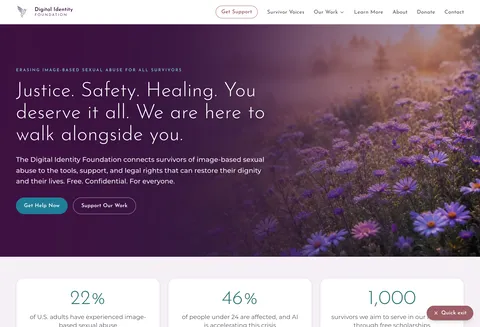


The Digital Identity Foundation. The Digital Identity Foundation helps survivors of image-based sexual abuse, including deepfakes and sextortion, find free and confidential support. For them, an outdated or broken page is not an inconvenience. It can be the difference between someone finding help or giving up. We kept the design they already had, made the site ADA compliant, and made it easy for AI tools and search engines to understand who they serve. Now the team updates the site by email. The result came fast:
In just one week, we had a 150% increase in victims finding us through online searches.
You can read the full story here.
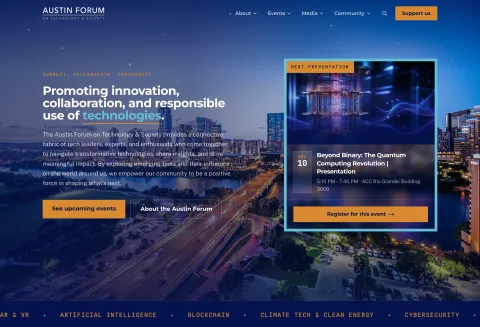
The Austin Forum on Technology & Society. The Austin Forum brings people together for events, discussions and podcasts about how technology affects society. When your work is events, a stale calendar is the fastest way to lose an audience. The site has to show what is next, every time. And it works: at one of their events, an attendee told the room he never searched for it. He asked his AI agent to find him something interesting in Austin, and it found the event, booked it and added it to his calendar. That only happens when the website is current and easy for AI to read.
E4 Youth. E4 Youth runs creative programs and career pathways for young people in Austin. Students, families, mentors and partners all need to see which programs are open right now and how to join. Programs change every season, so the website has to change with them.
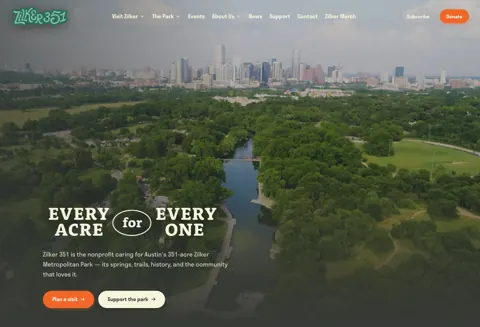
Zilker 351. Zilker 351 works to honor, preserve and enhance Austin's 351-acre Zilker Metropolitan Park through stewardship, history and community partnership. A whole city cares about that park, so the website has to be clear about what the organization does and how people can get involved.
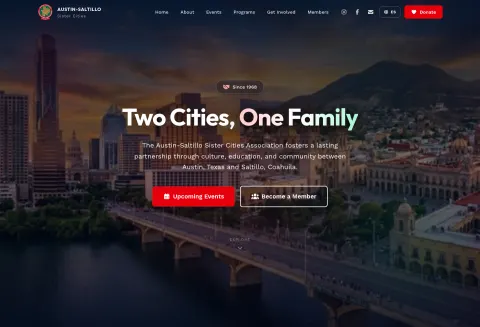
Austin-Saltillo Sister Cities Association. Since 1968, Austin-Saltillo Sister Cities has connected Austin, Texas and Saltillo, Coahuila, Mexico through culture, education and community. Its audience lives on both sides of the border, so the site works in English and Spanish, and both versions have to stay current together.
AAF Austin and AMA Austin. AAF Austin and AMA Austin serve Austin's advertising, creative and marketing communities. Their members are the people who judge websites for a living, so there is no hiding an outdated one. Events, programs and sponsors change constantly. (We are proud members of both.)
You can see every one of them, and the rest of our work, on our customers page.
What does “up to date” actually mean?
It is more than a fresh photo on the homepage. An up-to-date nonprofit website has:
- Current programs and events. Nothing that already happened is listed as coming up.
- A donate button that works. On every device, pointing to the donation platform you already use.
- The right people. Current staff, board and contact information, so people reach a person and not an old inbox.
- Accessibility. Readable with a screen reader, usable with a keyboard, clear on a small phone.
- Security. A valid security certificate (SSL), current software and backups, so your site is not the easy target.
- Proof of your work. Recent results, stories and numbers that show your impact, the things donors and foundations want to see.
- Clear information for search engines and AI. So when someone asks for help in your area, your organization is part of the answer.
How does a small team keep it current?
By making updates easy enough that they actually happen. That is the whole idea behind a SWATS Smart Website: you email the change, in plain words, with any photos attached. We send you a preview link. You approve it, and it goes live. No logins, no plugins, no dashboards, and no waiting for the one volunteer who knows how the site works.
Hosting, security updates, backups and monitoring are handled for you, so the website keeps working while your team keeps doing the work that matters. See how it works, or how SWATS works for nonprofits and foundations.
Common questions
How often should a nonprofit update its website?
Every time something real changes: a new program, an event, a campaign, a new board member, a new partner, a result worth sharing. For most nonprofits that means every few weeks, not once a year. A good rule: if your newsletter or your social posts mention it, your website should too.
Does an outdated website really affect donations?
Yes. Before most people give, they look you up. If the last event on your site is from two years ago, or the donate button leads to an error, many of them will simply leave. They will not email you to tell you. You just never see that gift.
Does a nonprofit website need to be accessible?
It should be. The people you serve may use a screen reader, a keyboard instead of a mouse, or an old phone with a bad connection. An accessible website lets all of them read your information and reach you. We treat accessibility as a basic requirement on every Smart Website, not an extra.
What happens to our website when the volunteer who built it leaves?
This is one of the most common problems we see. The site keeps running for a while, but nobody knows the password, nobody installs the updates, and nobody dares to change anything. Before that happens, make sure your organization (not a person) owns the domain, the hosting and the logins. Then choose a way to keep the site updated that does not depend on one volunteer.
Can a small nonprofit team keep its website updated without a web developer?
Yes, if updating it is as easy as sending an email. With a SWATS Smart Website, your team emails the change in plain words, gets a preview link back, and approves it. No logins, no plugins, no learning a builder. The website stays current and your team stays on the mission.
If your nonprofit's website is behind and you are not sure where to start, just email hello@swats.ai. We will look at your site and tell you honestly what it needs.
Keep reading
This is the way. 🤖
Jenaro Diaz
Founder & CEO, SWATS
Source: SWATS project experience with nonprofit clients, the public websites of the organizations named, and a client testimonial from Andrea Powell, Executive Director of The Digital Identity Foundation, 2026.